HP & Compaq BIOS Password Unlock in Chennai
Forgot an administrator, supervisor or firmware password on your HP & Compaq laptop? Ram Infotech assesses available recovery options after verifying ownership. We support Chennai customers through our branch network; exact eligibility and data risks depend on the model.
What is a HP & Compaq BIOS password lock?
A BIOS or supervisor password can prevent startup or firmware configuration changes. It is different from Windows login credentials and from an encrypted HDD or SSD password. We can assess HP EliteBook 840 G1 / G2 and other supported models, including BIOS administrator and power-on password enquiries. Recovery depends on security generation and ownership.
HP & Compaq models and password symptoms we assess
Our team can check HP EliteBook, ProBook, Pavilion, Envy, Victus, Omen and Compaq. Common symptoms include a password prompt before Windows, restricted BIOS settings, or a supervisor-password message. Availability depends on hardware generation, security policy and ownership documentation.
HP & Compaq BIOS Password Screen Examples
These HP & Compaq BIOS and firmware screen photos are examples from our earlier service page. The message and supported recovery route depend on the exact model. Photos are for identifying symptoms, not a guarantee of unlocking.
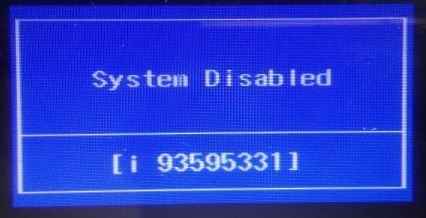
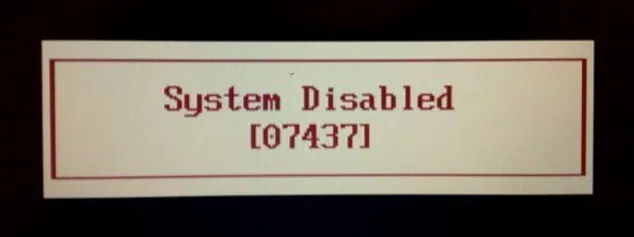
What does the password screen tell us?
Please note the model number, any error or challenge message, and whether Windows still boots. HP DriveLock, BitLocker and BIOS administrator passwords require different recovery procedures. Avoid repeatedly entering unknown passwords or attempting unofficial firmware modifications.
How does our authorised assessment work?
First, tell us your model and the issue. Second, provide purchase documentation or appropriate corporate authorisation. Third, we explain manufacturer-supported recovery choices, any potential data risks, and an estimate. Work starts only after your approval.
Can the files and Windows be retained?
The aim is to minimise data disruption, but data preservation cannot be guaranteed. Firmware configuration, encryption, and storage security can affect access. We recommend a backup where possible before any service.
How to request HP & Compaq BIOS password assistance in Chennai
Contact Ram Infotech at 9841983643 or send the laptop model and a description of the password prompt by WhatsApp. Do not share account passwords, recovery keys or personal documents in public comments. We will confirm the next steps after checking ownership.
Ram Infotech BIOS Password Service Videos
Watch our BIOS password support video playlist. These examples are for general information; assessment and authorised recovery options depend on your laptop model and proof of ownership.
Important: HP DriveLock, BitLocker and BIOS administrator passwords require different recovery procedures. We require proof of ownership or corporate authorisation. Pricing, completion time and data safety are confirmed only after assessment.
Our Clients Appreciate Our Expertise
Watch Ram Infotech customer service feedback videos.


Frequently Asked Questions
Common questions about HP & Compaq BIOS password support in Chennai.
Can Ram Infotech unlock a forgotten HP & Compaq BIOS password?
We assess authorised recovery options for a HP & Compaq device after reviewing the exact model and proof of ownership. Not every laptop can be unlocked.
Which HP & Compaq laptop models can you assess?
We can review HP EliteBook, ProBook, Pavilion, Envy, Victus, Omen and Compaq. Supported methods depend on the security configuration and manufacturer.
Will resetting the BIOS password delete my files?
A password assessment does not automatically erase files, but some recovery procedures may affect firmware settings or access to encrypted storage. Back up important files where possible.
What proof of ownership do I need?
Please bring a purchase invoice, appropriate identity or ownership documentation. Company-owned laptops require written authorisation from the organisation.
Does removing the CMOS battery reset the password?
Many modern laptops store security settings in non-volatile memory, so removing the CMOS battery may not reset a supervisor password.
How much does BIOS password recovery cost?
Costs depend on the model, symptoms and available authorised solution. We explain the estimate before any paid work begins.
How long does BIOS password support take?
Time varies by model and recovery method. We confirm feasibility and expected turnaround after inspection rather than guaranteeing a fixed time.
Can you help with Windows, BitLocker or hard disk passwords?
Windows account, BitLocker recovery and storage-drive passwords are separate issues and need different authorised recovery routes.
Do you provide pickup and delivery in Chennai?
Pickup and delivery may be available in selected Chennai areas. Contact us to confirm coverage and any conditions.
Where can I bring my laptop in Chennai?
Contact one of the Ram Infotech branches in Vadapalani, Adyar, OMR, Velachery, Madipakkam, Tambaram, Porur, Ambattur, Guduvanchery or Villivakkam.
Our Branches
Choose a Ram Infotech Chennai location and ask about HP & Compaq BIOS service before visiting.